Flutter Mini Native Ads Example
This Flutter Mini Native Ads example shows how to integrate lightweight native ads in Flutter apps. Ideal for feeds, lists, and high-performance UI where minimal disruption and fast rendering are critical.
Integrate Flutter Mini Native Ads SDK to display high-performance inline ads with better engagement and seamless UI experience.
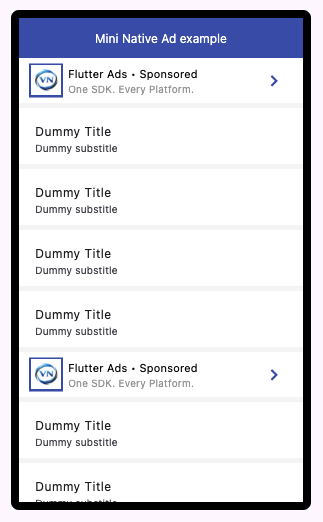
Mini Native Ad Preview
How Flutter Mini Native Ads Work
Mini Native ads are compact, inline ad units designed for seamless integration into Flutter apps. They provide high performance and better user experience compared to traditional banner ads by blending naturally within content.
1. Ensure Ads Available
Make sure ads are available before rendering.
await FlutterAds.instance.ensureAdsAvailable(
  adType: AdType.miniNative,
  context: context, // Required only if enableAutoFetch() has NOT been called
);
2. Render Ad
// Always returns a widget.
// If an ad is available it renders it,
// otherwise the provided placeholder is shown.

FlutterAds.instance.getMiniNativeAdWidget(
    placeholderWidget: const SizedBox(height: 60),
    testMode: true,
    styling: MiniNativeAdStylingModel(),
);

// Returns a widget only if an ad is available.
// If no ad exists, returns null — allowing you
// to conditionally render or skip placement.

FlutterAds.instance.maybeGetMiniNativeAdWidget(
    placeholderWidget: const SizedBox(height: 60),
    testMode: true,
    styling: MiniNativeAdStylingModel(),
);
3. Styling (Optional)
Customize the appearance using the styling model.
MiniNativeAdStylingModel(
    logoSize: 30,
    elevation: 0,
    tileStyle: AdListTileStyle(
        tileHeight: 45,
        tileTitleAlignment: MainAxisAlignment.center,
        tileElementsAlignment: CrossAxisAlignment.center,
        tileColor: Colors.white,
        titleTextStyle: const TextStyle(color: Colors.black, fontSize: 11),
        subtitleTextStyle: const TextStyle(color: Colors.grey, fontSize: 10),
    ),
    actionButtonColor: Theme.of(context).primaryColor,
)
Use Mini Native ads inside lists or feeds for best performance and user experience.